
Microsoft Azure Diagram in Cloud Computing: Types, Examples, and How to Create One
A Microsoft Azure diagram in cloud computing is a visual representation of how Azure services, applications, networks, databases, users, and external systems work together in a cloud environment.
Instead of reading a long list of Azure resources, an architecture diagram lets engineers and stakeholders see the relationships between those resources. A diagram might show a simple web application using Azure App Service and Azure SQL Database, or a production environment containing virtual networks, subnets, private endpoints, identity services, security controls, monitoring, databases, and multiple Azure regions.
The most useful Azure diagrams are not simply collections of service icons. They communicate architecture, relationships, boundaries, traffic flows, dependencies, and design decisions.
Microsoft's Azure Architecture Center provides architecture diagrams, reference architectures, solution ideas, and technology guidance for Azure workloads. Microsoft also maintains an official Azure architecture icons library for architecture diagrams and documentation.
Cloud Architecture
Create cloud architecture diagrams for AWS, Azure, GCP, and more. Design scalable infrastructure with professional cloud icons.
Learn what a Microsoft Azure diagram is in cloud computing, what it includes, common architecture types, real-world examples, Azure icons, and how to create one.
Click Cloud Architecture to open AI Line Studio and generate diagrams from natural language in seconds.
What Is a Microsoft Azure Diagram in Cloud Computing?
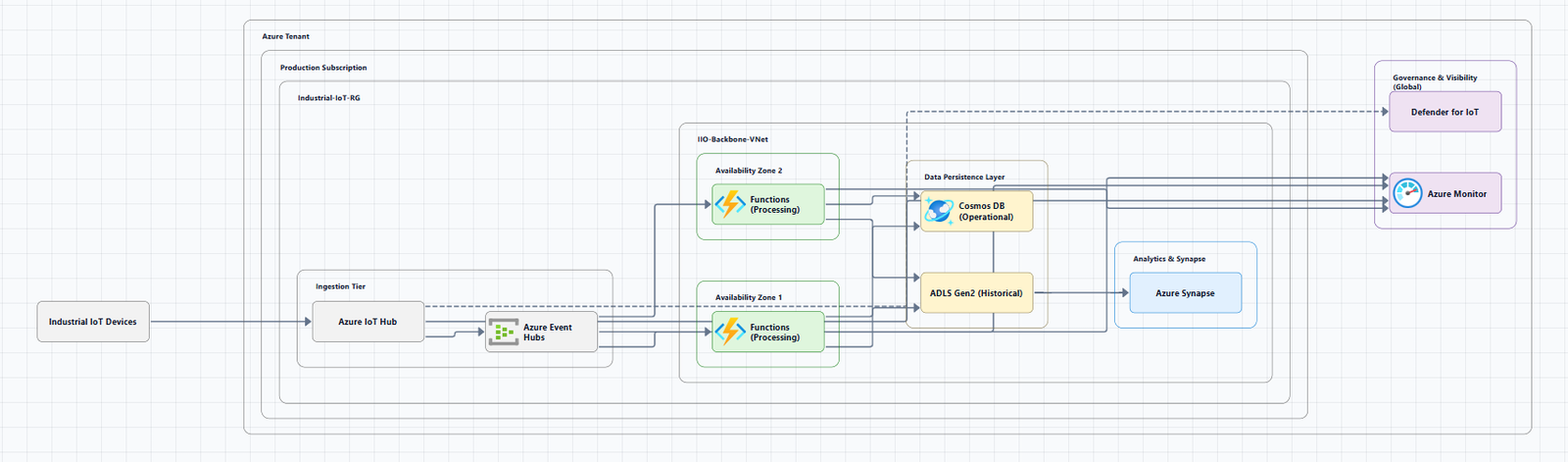
A Microsoft Azure diagram in cloud computing is a visual model that explains how an Azure-based cloud solution is structured.
It can represent Azure services, applications, databases, storage, networks, subnets, identity systems, security controls, users and clients, external systems, data flows, application dependencies, deployment environments, Azure regions, and availability zones.
For example, a basic cloud application could be represented as:
Users
  |
  v
Application Gateway
  |
  v
Azure App Service
  |
  +------------------+
  |                  |
  v                  v
Azure SQL         Azure Storage
This simple diagram answers an important question: How does a user's request move through the cloud application?
A more detailed production diagram could add networking, authentication, private connectivity, monitoring, secrets management, backups, and external integrations.
Why use a diagram instead of a list of Azure services?
Because architecture is primarily about relationships.
Knowing that an application uses Azure App Service, Azure SQL Database, Azure Key Vault, and Azure Storage doesn't tell you which component receives traffic first, which service communicates with the database, whether the database is publicly accessible, where authentication occurs, how services communicate, which resources are inside a virtual network, where data is stored, or how monitoring works.
A diagram can communicate these relationships at a glance.
How Azure Fits Into Cloud Computing
Cloud computing provides on-demand access to computing, storage, networking, databases, application platforms, and other IT capabilities.
Microsoft Azure provides these capabilities through a large collection of cloud services.
An Azure cloud architecture typically combines services from several categories.
| Cloud computing area | Azure examples | Role in an architecture |
|---|---|---|
| Compute | Azure Virtual Machines, App Service | Run applications and workloads |
| Containers | Azure Kubernetes Service, Azure Container Apps | Run containerized applications |
| Networking | Azure Virtual Network, Application Gateway | Connect and route workloads |
| Storage | Azure Blob Storage | Store objects and files |
| Databases | Azure SQL Database, Azure Cosmos DB | Persist application data |
| Identity | Microsoft Entra ID | Authentication and identity |
| Security | Azure Firewall, Key Vault | Protect applications and secrets |
| Integration | Azure Service Bus, Event Grid | Connect distributed components |
| Monitoring | Azure Monitor, Application Insights | Observe application and infrastructure behavior |
| AI | Azure AI services and related Azure capabilities | Add AI and machine-learning functionality |
The diagram connects these services into a coherent architecture. The exact architecture depends on workload requirements. There is no single Azure architecture that should be copied into every application.
Why Azure Architecture Diagrams Matter
An Azure architecture diagram gives different teams a shared visual representation of a cloud solution.
- For cloud architects, It helps communicate architectural decisions and system boundaries.
- For developers, It shows application dependencies and the services surrounding the application.
- For DevOps teams, It helps explain deployment environments, infrastructure dependencies, networking, and operational components.
- For security teams, It can expose trust boundaries, public endpoints, identity flows, network paths, and security controls.
- For business stakeholders, A high-level diagram can explain how an application works without requiring detailed knowledge of Azure.
- For documentation teams, The diagram becomes a visual reference for the architecture.
Microsoft's current guidance emphasizes that architecture diagrams help implementers, security reviewers, and business stakeholders develop a shared understanding of a system. It also recommends using different diagram types for different questions rather than forcing every detail into one diagram. See Microsoft's guide to Azure architecture design diagrams.
Main Types of Microsoft Azure Diagrams
There isn't one universal Azure diagram. Different diagrams answer different architecture questions.
1. Azure Solution Architecture Diagram
A solution architecture diagram provides a high-level view of an entire Azure workload, including users, applications, Azure services, databases, networking, external systems, identity, security, monitoring, and data flows.
This is often the best diagram for explaining an overall cloud solution.
2. Azure Cloud Architecture Diagram
An Azure cloud architecture diagram focuses on how cloud services combine to deliver a workload.
                  Customers
                      |
                      v
                Azure Front Door
                      |
                      v
              Application Layer
                 /          \
                /            \
               v              v
         Azure SQL       Azure Storage
               |
               v
          Key Vault
A production architecture may add multiple regions, private networking, identity, observability, caching, messaging, and disaster recovery.
3. Azure Network Diagram
An Azure network diagram focuses on connectivity: virtual networks, subnets, network security groups, Azure Firewall, VPN Gateway, ExpressRoute, private endpoints, Application Gateway, load balancing, on-premises networks, and VNet peering.
Network diagrams are particularly valuable for infrastructure and security reviews.
4. Azure Infrastructure Diagram
An infrastructure diagram focuses on the actual infrastructure components supporting the workload: virtual machines, VNets, subnets, load balancers, storage, databases, firewalls, gateways, private endpoints, monitoring, and backup infrastructure.
This diagram is generally more detailed than an executive-level solution diagram.
5. Azure Application Architecture Diagram
An application architecture diagram focuses on software components and their dependencies.
                    Client
                      |
                      v
                 API Gateway
                      |
        +-------------+-------------+
        |             |             |
        v             v             v
   User Service  Order Service  Payment Service
        |             |             |
        v             v             v
     Database      Database      Payment API
The Azure services used to implement these components depend on application requirements.
6. Azure Deployment Diagram
A deployment diagram explains where application components are deployed: development, testing, staging, production, Azure regions, availability zones, virtual machines, containers, Kubernetes, app services, and databases.
Microsoft describes deployment diagrams as diagrams that map software components to the infrastructure that hosts them. They are particularly useful for DevOps planning and understanding deployment boundaries.
7. Azure Data Flow Diagram
A data flow diagram focuses on how data moves through the system, useful for data architecture, security reviews, data governance, compliance discussions, integration design, and troubleshooting.
8. Azure Microservices Architecture Diagram
A microservices diagram represents independently deployable application services and their communication paths. Additional components might include Azure Kubernetes Service, Azure Container Apps, Azure Service Bus, Event Grid, Azure Container Registry, and Azure Monitor.
9. Azure Hybrid Cloud Diagram
A hybrid architecture diagram shows how on-premises infrastructure connects with Azure via VPN or ExpressRoute into an Azure Virtual Network hosting application and database services.
This is useful for organizations that maintain on-premises systems while moving selected workloads to Azure.
10. Azure Security Architecture Diagram
A security architecture diagram focuses on identity, authentication, authorization, network boundaries, public and private access, encryption, secrets, security controls, monitoring, and trust boundaries.
Security diagrams are especially useful during architecture reviews and threat-modeling exercises.
What Components Should an Azure Diagram Include?
The answer depends on the diagram's purpose. However, many useful Azure architecture diagrams contain:
- Users and clients, Web browsers, mobile applications, internal applications, APIs, external services, IoT devices
- Compute, Azure Virtual Machines, App Service, Functions, Kubernetes Service, Container Apps
- Networking, Virtual Network, subnets, Application Gateway, load balancers, VPN Gateway, ExpressRoute, private endpoints
- Data, Azure SQL Database, Cosmos DB, Storage, Data Lake services
- Identity, Microsoft Entra ID
- Security, Key Vault, Azure Firewall, Web Application Firewall, network security controls, private connectivity
- Observability, Azure Monitor, Application Insights, logs, metrics, alerts
Azure Diagram Example: Three-Tier Web Application
A common cloud architecture is a three-tier application with presentation, application, and data tiers, often backed by Azure SQL and Azure Storage, plus Key Vault and Azure Monitor for secrets and observability.
The diagram should not be interpreted as a universal recommended Azure topology. It is an illustrative architecture showing how application, data, security, and monitoring components can relate to each other.
Azure Diagram Example: Microservices
A microservices architecture introduces additional communication paths across an API gateway, multiple services, per-service data stores, and often a message broker.
The diagram becomes especially useful when explaining service boundaries, synchronous and asynchronous communication, data ownership, messaging, failure boundaries, and scaling boundaries.
Azure Diagram Example: Hybrid Architecture
A hybrid cloud architecture may connect an existing data center to Azure through VPN or ExpressRoute into an Azure Virtual Network hosting application and managed data services.
The exact connectivity architecture depends on requirements such as latency, security, bandwidth, availability, routing, and operational ownership.
How to Create a Microsoft Azure Diagram
A useful diagram starts with architecture thinking, not icon placement. Follow this process when you want to create Azure architecture diagrams.
Step 1: Define the question
Before opening a diagramming tool, determine what the diagram needs to communicate, traffic path, data storage, authentication, hybrid connectivity, deployment, or security boundaries. This determines the diagram type.
Step 2: List the major components
Write the architecture as text first, then determine the relationships.
Step 3: Define boundaries
Group resources by Azure subscription, resource group, region, availability zone, virtual network, subnet, application, or trust boundary.
Step 4: Map the relationships
Determine how components communicate, then add supporting relationships such as Key Vault, storage, and monitoring.
Step 5: Add directional arrows
Use arrows when the direction of traffic or data matters. Microsoft's architecture diagram guidance emphasizes clear relationships and intentional diagram notation to reduce ambiguity.
Step 6: Add Azure icons
Microsoft provides an official Azure architecture icon collection for diagrams and documentation. Place the product name near the icon and use icons as they appear within Azure. Do not crop, flip, rotate, distort, or change the shape of the icons.
The Microsoft icon library was updated in July 2026, including more than 10 new icons and updates to Microsoft Foundry-related icons.
Step 7: Label important connections
Don't make the reader guess what a connection means. Labels can identify protocols, data flows, authentication, network paths, messaging, and synchronization.
Step 8: Add metadata
For architecture documentation, consider adding diagram title, owner, version, last updated date, scope, and legend.
Step 9: Review the diagram
Confirm technical accuracy, missing components, arrow clarity, network boundaries, public vs private resources, external dependencies, service names, detail level, and alignment with the deployed architecture.
Azure Architecture Diagram Best Practices
- Design for the audience, An executive diagram and a network engineering diagram should not contain the same amount of detail.
- Give the diagram one primary purpose, Create separate views when necessary.
- Use progressive detail, Level 1 system context through Level 5 detailed data/security flow. Microsoft recommends selecting and layering diagram types according to the message, audience, and lifecycle stage.
- Use official Azure icons, Official icons make Azure services recognizable.
- Don't distort icons, Do not stretch, rotate, flip, crop, or change their shape.
- Keep relationships readable, Avoid lines crossing unnecessarily.
- Distinguish boundaries, Use containers for VNets, subnets, and trust boundaries.
- Avoid excessive detail, Include enough information to answer the intended question.
- Keep diagrams current, Treat the diagram as a living technical artifact.
- Connect diagrams to architecture decisions, Explain why components are arranged the way they are.
Azure Diagrams and the Well-Architected Framework
An Azure architecture should consider more than whether the application works.
Microsoft's Azure Well-Architected Framework organizes architecture considerations around five pillars: Reliability, Security, Cost Optimization, Operational Excellence, and Performance Efficiency.
A diagram can help teams visualize the components involved in these concerns, although a diagram by itself does not prove that a workload satisfies the framework.
Azure Architecture Diagrams vs. Azure Resource Diagrams
| Azure architecture diagram | Azure resource diagram |
|---|---|
| Explains design | Shows resources |
| Focuses on relationships | Focuses on inventory/topology |
| Used for architecture communication | Used for infrastructure visibility |
| Can be conceptual | Usually more implementation-oriented |
| May omit low-level resources | Can contain many resources |
A good architecture diagram doesn't need to show every resource in an Azure subscription. Its purpose is to make the architecture understandable.
Azure Diagram Tools
The right diagramming tool depends on the workflow.
Manual diagramming
Traditional diagramming tools provide detailed control over layout, connectors, shapes, labels, architecture boundaries, and documentation. This is useful when the architecture needs significant manual refinement.
Azure architecture examples
Microsoft's Azure Architecture Center is useful when you want reference architectures rather than starting from a blank canvas. The current Architecture Center includes hundreds of Azure architecture examples and solution ideas.
AI-powered diagram generation
AI changes the initial diagramming workflow. Instead of manually placing every service, an architect can describe the intended architecture in natural language.
For example: Create a production Azure web application using Application Gateway, App Service, Azure SQL Database, Key Vault, private connectivity, monitoring, and high availability.
An AI diagramming system can use this description as a starting point for visualizing the architecture.
Microsoft itself published an Azure AI architecture diagram builder in 2026 that uses AI to help architects design Azure solutions, showing that natural-language-driven architecture diagramming is becoming part of modern Azure design workflows.
However, generated diagrams still require human review. An AI-generated visual should not automatically be treated as a production-ready architecture.
If you want to turn an Azure architecture description into a visual starting point, use AI Line Studio's Azure diagram generator to generate an Azure-focused architecture diagram and then refine the result.
For broader system designs, the AI architecture diagram generator supports multi-provider workflows. You can refine layouts with AI-powered architecture diagramming and edit in the AI canvas.
Azure Architecture Diagram Tools: Manual vs. AI
| Approach | Best use | Strength | Limitation |
|---|---|---|---|
| Manual diagramming | Detailed architecture | High control | More manual work |
| Templates | Repeated architectures | Fast starting point | Requires customization |
| Microsoft reference architectures | Learning and design | Official guidance | May not match your workload |
| AI diagram generation | Initial visualization | Fast architecture-to-diagram workflow | Requires validation |
| Code-based diagrams | Version-controlled documentation | Fits engineering workflows | Requires technical setup |
The right choice depends on the complexity of the architecture and how frequently the diagram changes.
Azure Architecture Diagram Templates
Templates are useful when teams repeatedly create similar diagrams. A useful Azure template might contain an Azure boundary, region, virtual network, subnets, application layer, data layer, external systems, identity, security, and monitoring.
But a template should be a starting point, not a substitute for architecture decisions such as compute service choice, private database access, traffic routing, scaling, and disaster recovery.
Where to Find Azure Architecture Examples
Microsoft's Azure Architecture Center is one of the most useful first-party resources for studying Azure architectures. It provides architecture diagrams and technology descriptions for reference architectures, real-world cloud architectures, and solution ideas.
Examples include architectures involving Azure App Service, Azure Functions, Azure Kubernetes Service, Azure SQL Database, Azure Managed Redis, DevSecOps, migration, data platforms, and hybrid environments.
Common Azure Diagram Mistakes
- Treating the diagram as an Azure service list, Show relationships, not just services.
- Putting everything into one diagram, Create multiple views.
- Using unclear arrows, Use directional arrows and labels.
- Ignoring network boundaries, Show VNets, subnets, and private connectivity when they matter.
- Using outdated icons, Use Microsoft's current official icon set (updated July 2026).
- Distorting Azure icons, Don't stretch, rotate, flip, crop, or modify Microsoft product icons.
- Designing for aesthetics instead of accuracy, Validate every important relationship against the actual system.
- Failing to maintain the diagram, Add ownership and update information.
Microsoft Azure Diagram Checklist
- The diagram has a clearly defined purpose
- The intended audience is known
- Major components are included
- Important external dependencies are visible
- Azure services are correctly named
- Official Azure icons are used where appropriate
- Icons have not been distorted
- Network boundaries are clear
- Data flows are understandable
- Traffic direction is clear
- Important relationships are labeled
- Security boundaries are represented when relevant
- Identity dependencies are represented when relevant
- Monitoring is represented when relevant
- The diagram isn't unnecessarily crowded
- A legend is included if needed
- Version and ownership are documented
- The diagram has been technically reviewed
- The visual still matches the deployed architecture
Conclusion
A Microsoft Azure diagram in cloud computing is useful because it turns a collection of cloud services into an understandable picture of the system.
The most effective diagram doesn't attempt to show everything. It answers a specific architecture question.
Start with the purpose of the diagram, identify the major components, establish boundaries, map relationships, use clear directional flows, and select the right level of detail.
For complex systems, create multiple views rather than forcing application architecture, networking, deployment, security, and data flow into one crowded image.
Microsoft's own architecture guidance recommends choosing and layering diagram types according to the message, audience, and lifecycle stage.
For Azure-specific visuals, use Microsoft's current official icon library and follow its usage guidelines.
If you already know the architecture you want to communicate, an AI-powered Azure diagram generator can also provide a useful starting point before you validate and refine the design.
Generate an Azure architecture diagram with AI Line Studio
For broader cloud architecture workflows, explore the AI cloud architecture diagram generator.
Frequently Asked Questions
A Microsoft Azure diagram in cloud computing is a visual representation of how Azure services and other system components work together to deliver a cloud workload. It can show applications, networks, databases, storage, identity, security, users, external systems, and data flows.