
Landing Zone Azure Diagram: Architecture, Components, and Examples
An Azure landing zone diagram shows how an organization structures its Azure environment for security, governance, networking, identity, management, and workload deployment.
Unlike a basic Azure architecture diagram that focuses on one application, a landing zone diagram typically describes the foundation around many workloads. It can show management groups, subscriptions, platform services, application landing zones, identity, connectivity, security, monitoring, Azure Policy, and automation.
A well-designed landing zone diagram answers an important question: How should an Azure environment be organized before and while application teams deploy workloads into it?
Microsoft's Azure Cloud Adoption Framework defines Azure landing zones as a standardized approach for establishing and managing Azure environments at scale. See what is an Azure landing zone. The reference architecture is modular and intended to be tailored to an organization's requirements rather than copied without modification.
Cloud Architecture
Create cloud architecture diagrams for AWS, Azure, GCP, and more. Design scalable infrastructure with professional cloud icons.
Learn how to read and create an Azure landing zone diagram, including platform and application landing zones, management groups, networking, governance, security, and IaC.
Click Cloud Architecture to open AI Line Studio and generate diagrams from natural language in seconds.
What Is an Azure Landing Zone?
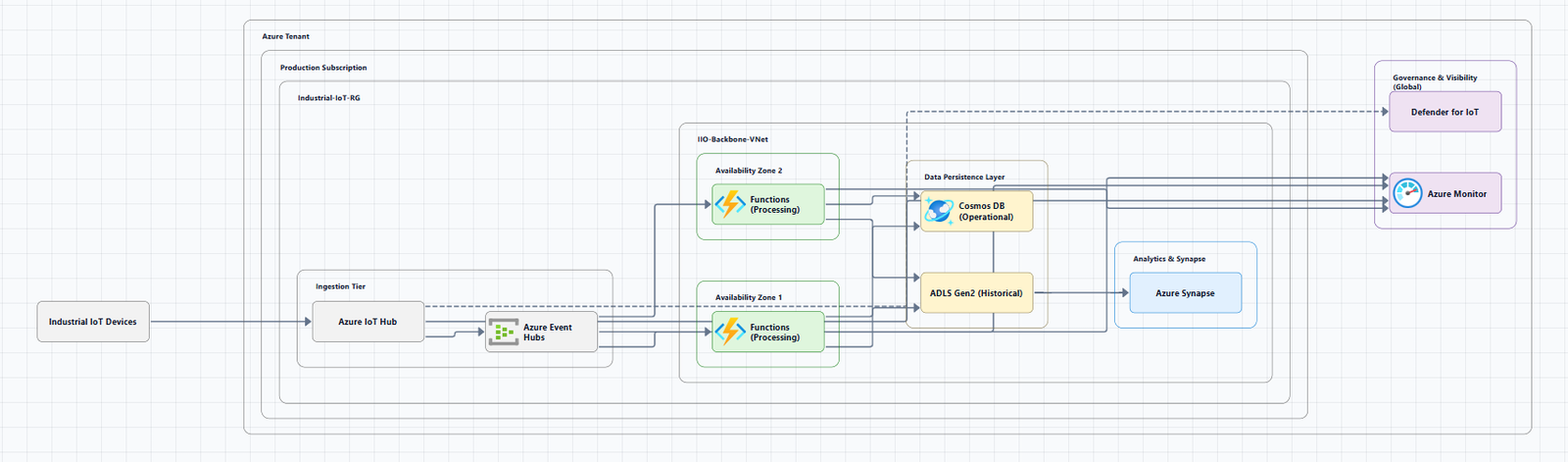
An Azure landing zone is a standardized foundation for deploying and managing workloads in Microsoft Azure.
It establishes the organizational, security, networking, governance, identity, management, and automation structures that workloads can use.
The landing zone approach separates shared platform capabilities from workload-specific resources.
                    Azure Tenant
                         |
                         v
                Management Groups
                         |
              +----------+----------+
              |                     |
              v                     v
      Platform Landing Zones   Application Landing Zones
              |                     |
      +-------+-------+       +-----+-----+
      |       |       |       |           |
   Identity Connectivity Management   Workloads
The exact hierarchy varies by organization.
Microsoft's reference architecture is an opinionated target architecture and should be treated as a starting point that can be customized for business, security, regulatory, networking, and operational requirements. Review the Azure landing zone design areas and the Azure landing zone reference architecture.
What Does an Azure Landing Zone Diagram Show?
A landing zone diagram generally represents the Azure platform foundation and the relationship between that foundation and application workloads.
Depending on the level of detail, it may show the Microsoft Entra tenant, management groups, Azure subscriptions, platform landing zone, application landing zones, identity services, connectivity services, management and monitoring, security services, Azure Policy, Azure RBAC, virtual networks, hub-and-spoke networking, Azure Virtual WAN, Azure Firewall, VPN Gateway, ExpressRoute, private DNS, workload resources, Infrastructure as Code, and deployment pipelines.
The most useful diagrams distinguish between resources that are shared platform capabilities and resources that belong to individual workloads.
Azure Landing Zone Architecture at a Glance
                         Microsoft Entra Tenant
                                  |
                                  v
                         Tenant Root Group
                                  |
                                  v
                      Organization Management Group
                                  |
                 +----------------+----------------+
                 |                                 |
                 v                                 v
             Platform                         Landing Zones
           Management Group                 Management Group
                 |                                 |
       +---------+---------+             +---------+---------+
       |         |         |             |         |         |
       v         v         v             v         v         v
   Identity  Connectivity Management   Corp     Online    Local
This is a conceptual representation, not a universal deployment template.
Microsoft's current Azure landing zone reference architecture includes platform and application landing zones and organizes subscriptions through management groups. The default hierarchy includes areas such as Platform, Landing Zones, Security, Management, Connectivity, Identity, Online, Corp, Local, Sandboxes, and Decommissioned, although organizations can tailor the hierarchy to their requirements.
Platform Landing Zone vs. Application Landing Zone
This is one of the most important concepts to understand when reading an Azure landing zone diagram.
Platform landing zone
A platform landing zone provides shared services that multiple application workloads can consume.
Common platform capabilities include identity, connectivity, management, security, monitoring, shared networking, and centralized governance services.
The platform team generally manages these shared capabilities.
Application landing zone
An application landing zone contains the resources for a particular workload or application environment, application services, databases, storage, and workload-specific monitoring.
An organization may have many application landing zones. Each workload can have its own subscription or set of subscriptions depending on requirements such as scale, service limits, security boundaries, and operational ownership.
Microsoft distinguishes platform landing zones from application landing zones specifically because shared platform services and workload resources have different operational responsibilities.
Azure Landing Zone Management Group Hierarchy
Management groups provide an important organizational layer in an Azure landing zone. They allow organizations to organize subscriptions and apply governance at a higher scope.
Why management groups matter: they can help apply policies across multiple subscriptions, organize subscriptions, separate workloads by governance requirements, establish security boundaries, delegate management, and support large-scale Azure adoption.
However, management groups should not simply reproduce an organization's internal departmental chart. The hierarchy should be designed around governance, security, compliance, connectivity, and operational requirements.
Microsoft currently recommends limiting unnecessary hierarchy depth and avoiding management-group structures that add complexity without a governance purpose.
Common Management Groups in an Azure Landing Zone Diagram
| Management Group | Purpose |
|---|---|
| Platform | Contains shared platform capabilities |
| Security | Centralized security/SIEM services |
| Management | Monitoring and management services |
| Connectivity | Centralized network connectivity |
| Identity | Identity-related platform resources |
| Landing Zones | Parent for application workloads |
| Corp | Workloads requiring corporate connectivity |
| Online | Workloads with internet-oriented connectivity |
| Local | Azure Local-related workloads |
| Sandboxes | Isolated experimentation |
| Decommissioned | Resources scheduled for removal |
These names and structures should not be treated as mandatory for every organization. Microsoft explicitly supports tailoring the landing zone hierarchy when requirements justify it.
The Eight Azure Landing Zone Design Areas
A strong Azure landing zone diagram should reflect the major architectural decisions behind the environment.
Microsoft's current Cloud Adoption Framework identifies eight core design areas: Azure billing and Microsoft Entra tenant, identity and access management, resource organization, network topology and connectivity, security, management, governance, and platform automation and DevOps.
- Azure Billing and Microsoft Entra Tenant, Establish an appropriate Azure tenant and billing structure before building the environment.
- Identity and Access Management, Microsoft Entra ID, RBAC, managed identities, privileged access, administrative groups, and workload identities.
- Resource Organization, Structure subscriptions, management groups, resource groups, and workloads.
- Network Topology and Connectivity, How workloads communicate with other Azure workloads, shared platform services, the internet, on-premises infrastructure, and other networks. Common approaches include hub-and-spoke networking and Azure Virtual WAN.
- Security, Azure Firewall, network security controls, Microsoft Defender for Cloud, Microsoft Sentinel, key management, security monitoring, and private connectivity. Microsoft also recommends incorporating Zero Trust practices in landing zones.
- Management, Monitoring, logging, alerts, backup, recovery, and operational processes.
- Governance, Azure Policy to audit and enforce organizational requirements at appropriate scopes.
- Platform Automation and DevOps, Infrastructure as Code with Bicep, Terraform, Azure Verified Modules, GitHub, Azure DevOps, and CI/CD pipelines. See Azure landing zone implementation options.
Azure Landing Zone Network Architecture
Networking is one of the most visible parts of many landing zone diagrams. Two common conceptual networking approaches are hub-and-spoke and Azure Virtual WAN.
Hub-and-spoke Azure Landing Zone
                       Internet
                           |
                           v
                     Hub VNet
                           |
             +-------------+-------------+
             |             |             |
             v             v             v
          Firewall       DNS         Connectivity
             |
       +-----+-----+
       |           |
       v           v
   Spoke VNet   Spoke VNet
   Workload A   Workload B
A centralized hub can provide shared services such as firewall, connectivity, DNS, VPN, ExpressRoute, and network monitoring. Spokes contain workload-specific resources.
Azure Virtual WAN
Azure Virtual WAN provides another networking model for organizations with distributed connectivity requirements, connecting branches, Azure regions, and on-premises networks to virtual networks and application workloads.
Microsoft's landing zone reference architecture provides both hub-and-spoke and Virtual WAN conceptual architecture options.
Platform Landing Zone Architecture Example
A more detailed conceptual platform architecture connects Identity, Connectivity, and Management under Platform, while Landing Zones host Corp and Online workloads that consume shared Entra ID, Hub VNet, Firewall, DNS, VPN, ExpressRoute, Monitor, and Logs.
This diagram illustrates the important relationship: platform services support application landing zones. The platform doesn't necessarily contain the application's business logic.
Application Landing Zone Architecture Example
An application landing zone may contain App Services and Data Services (web, API, worker, SQL, storage) while consuming central identity, network, monitoring, security, and governance policies from the platform.
This separation helps platform teams provide common capabilities while application teams focus on their workloads.
What Should an Azure Landing Zone Diagram Include?
- Organizational layer, Tenant, management groups, subscriptions
- Platform layer, Identity, connectivity, management, security
- Workload layer, Application landing zones, workload subscriptions, application resources, databases, storage, compute
- Governance layer, Azure Policy, RBAC, compliance controls, security baselines
- Network layer, Hub, spokes, Virtual WAN, firewalls, VPN, ExpressRoute, DNS
- Automation layer, Terraform, Bicep, Azure Verified Modules, GitHub, Azure DevOps, CI/CD
Do not put every Azure resource into one diagram. The diagram should communicate the architecture at the level appropriate for its audience.
How to Create an Azure Landing Zone Diagram
Use this process when you want to create Azure architecture diagrams for landing zones.
- Define the purpose, Overall Azure governance, platform architecture, network architecture, subscription hierarchy, application landing zones, security architecture, or IaC deployment model.
- Define the organization hierarchy, Tenant → Management Groups → Subscriptions → Resource Groups → Resources.
- Separate platform and workloads, Identify shared platform capabilities separately from application workloads.
- Choose the networking model, Hub-and-spoke, Azure Virtual WAN, or another topology that reflects actual connectivity requirements.
- Add governance, Azure Policy, RBAC, security controls, compliance requirements.
- Add security and management, Monitoring, logging, security operations, identity, firewalling, governance.
- Add automation, GitHub → Terraform/Bicep → Azure Verified Modules → Azure Landing Zone.
- Add workload resources, Only after the foundation is clear.
- Validate the diagram, Management hierarchy, subscription boundaries, network relationships, identity flows, governance scope, security controls, workload boundaries, automation, and ownership.
Azure Landing Zone Diagram vs. Azure Architecture Diagram
| Azure Landing Zone Diagram | Azure Architecture Diagram |
|---|---|
| Focuses on cloud foundation | Focuses on a solution/workload |
| Shows governance | Shows application architecture |
| Shows management groups | May not show management groups |
| Shows subscriptions | May show only relevant subscriptions |
| Shows platform services | Shows application components |
| Shows connectivity model | Shows application/data flows |
| Designed for enterprise cloud adoption | Designed for a specific solution |
They answer different questions and should not be treated as interchangeable.
Azure Landing Zone Diagram vs. Enterprise-Scale Architecture
"Enterprise-scale" is closely associated with Azure landing zones and the Cloud Adoption Framework, but the terms should not be treated as interchangeable in every context.
The current Azure landing zone approach provides a reference architecture and Azure landing zone design principles for establishing an Azure environment at scale. The architecture is intentionally modular and can be tailored to organizational, security, compliance, networking, workload, operational, and regulatory requirements.
Azure Landing Zone Governance
Governance is one of the main reasons organizations use landing zones. A governance model can control which resources can be deployed, where they can be deployed, required security configurations, allowed SKUs, required tags, logging requirements, network restrictions, and compliance requirements.
Azure Policy is commonly used to implement policy-driven governance across management groups and subscriptions. The exact policy structure should be designed around organizational requirements.
Azure Landing Zone Security
Security should be designed into the landing zone rather than added after workloads are deployed.
- Identity, Microsoft Entra ID, RBAC, managed identities, privileged access
- Network security, Network segmentation, Azure Firewall, NSGs, private connectivity, controlled ingress and egress
- Security monitoring, Microsoft Defender for Cloud, Microsoft Sentinel, Azure Monitor, Log Analytics
- Governance, Azure Policy, compliance controls, resource restrictions, standardized configurations
Azure Landing Zone and Infrastructure as Code
For organizations operating Azure at scale, Infrastructure as Code can make the landing zone repeatable and maintainable.
Developer / Platform Engineer
             |
             v
        Git Repository
             |
             v
       CI/CD Pipeline
             |
       +-----+-----+
       |           |
       v           v
   Terraform     Bicep
       |           |
       +-----+-----+
             |
             v
     Azure Verified Modules
             |
             v
      Azure Landing Zone
Microsoft currently recommends IaC approaches for deploying and managing platform landing zones, including the Azure landing zone IaC Accelerator and Azure Verified Modules for Terraform or Bicep.
Benefits include repeatability, version control, automation, consistency, easier review, easier environment replication, and reduced manual configuration.
Azure Landing Zone Terraform vs. Bicep
| Terraform | Bicep |
|---|---|
| Multi-cloud IaC capability | Azure-focused IaC |
| Uses HCL | Uses Bicep syntax |
| Large provider ecosystem | Native Azure Resource Manager experience |
| Strong module ecosystem | Azure-native tooling |
| Common in platform engineering | Common in Azure-centric environments |
The choice depends on the organization's skills, existing tooling, governance model, and broader infrastructure strategy. Microsoft's current landing zone implementation guidance supports both through Azure Verified Modules.
Azure Landing Zone Diagram Best Practices
- Start with the management hierarchy, Tenant → Management Groups → Subscriptions → Landing Zones.
- Separate platform and application workloads, Use clear visual boundaries.
- Show governance as a control layer, Don't make Azure Policy look like another application service.
- Make network boundaries obvious, Show hubs, spokes, subscriptions, and connectivity relationships clearly.
- Use progressive detail, Executive overview, hierarchy, network, security, platform services, application landing zone, and IaC/deployment architecture.
- Use consistent notation, Containers, arrows, labels, icon sizes, typography, boundaries.
- Don't copy Microsoft's reference architecture blindly, Tailor it to actual requirements.
- Document ownership, Owner, version, last updated, scope, environment.
- Keep the diagram synchronized with IaC, When Terraform or Bicep changes the environment, update documentation.
Common Azure Landing Zone Diagram Mistakes
- Treating the reference architecture as mandatory, Tailor it to actual organizational requirements.
- Putting every workload into one diagram, Use separate platform and workload views.
- Confusing management groups with subscriptions, Clearly distinguish the hierarchy.
- Ignoring platform services, Show shared identity, connectivity, management, and security capabilities.
- Drawing networking without governance, Include governance, security, identity, and management where relevant.
- Creating excessive management-group depth, Keep the hierarchy as simple as requirements allow.
- Using an architecture diagram as an inventory, Focus on relationships and decisions.
- Not updating the diagram, Treat architecture diagrams as maintained technical documentation.
Azure Landing Zone Diagram Checklist
- Microsoft Entra tenant is represented where relevant
- Management group hierarchy is clear
- Subscriptions are represented
- Platform landing zone is distinguished
- Application landing zones are distinguished
- Identity architecture is represented
- Connectivity architecture is represented
- Network topology is clear
- Security controls are represented
- Governance is represented
- Management/monitoring is represented
- Automation/IaC is represented when relevant
- Workload boundaries are clear
- Ownership is documented
- Diagram scope is defined
- Diagram is not unnecessarily crowded
- Relationships are clear
- The architecture reflects actual requirements
- The diagram can be maintained as the environment changes
How to Choose the Right Azure Landing Zone Diagram
| If you need to explain... | Use this diagram |
|---|---|
| Entire Azure environment | Landing zone overview |
| Management group hierarchy | Resource organization diagram |
| Shared platform services | Platform landing zone diagram |
| Application workloads | Application landing zone diagram |
| Network connectivity | Landing zone network diagram |
| Security controls | Landing zone security diagram |
| Governance | Policy/governance architecture |
| IaC deployment | Landing zone automation diagram |
| One workload | Application architecture diagram |
| Data movement | Data flow diagram |
Large organizations often need several of these rather than one enormous architecture image.
Can AI Generate an Azure Landing Zone Diagram?
Yes. AI-powered diagramming can be useful for creating an initial visual representation from a written architecture description.
For example: Create an Azure landing zone architecture with management groups, platform subscriptions for identity, connectivity and management, application landing zones for corporate and online workloads, hub-and-spoke networking, Azure Firewall, Azure Policy, monitoring, and Terraform-based deployment.
An AI diagramming tool can turn that description into a starting architecture visualization.
However, the generated diagram should be reviewed by an Azure architect or platform engineer. AI should accelerate visualization, not replace decisions about governance, identity, security, network topology, subscription boundaries, compliance, operational ownership, and workload requirements.
For teams that already know their desired landing zone structure, an AI-powered Azure diagram generator can be used to turn the architecture description into a visual starting point.
Azure Landing Zone Diagram Tools
There are several ways to create a landing zone diagram.
- Microsoft reference architecture, Downloadable landing zone architecture diagrams, including Visio and PDF versions of conceptual architectures.
- Manual diagramming, Useful for precise control over management groups, subscription boundaries, networking, policies, security, workloads, and documentation. Refine layouts in the AI canvas.
- Infrastructure-as-Code diagrams, Teams using Terraform or Bicep may prefer diagrams closely connected to infrastructure definitions.
- AI-powered diagramming, Accelerate initial creation of complex diagrams by converting architecture descriptions into visual structures. Use the AI architecture diagram generator for broader system views, or the AI cloud architecture diagram generator for multi-service cloud foundations.
The final result should still be reviewed against the actual landing zone implementation.
Conclusion
An Azure landing zone diagram is fundamentally a map of the foundation around your Azure workloads.
The most important elements are not individual Azure icons. They are the relationships between:
Tenant → Management Groups → Subscriptions → Platform Services → Application Landing Zones → Workloads
A strong landing zone architecture also makes identity, networking, security, management, governance, and automation visible.
Microsoft's current Cloud Adoption Framework provides a reference architecture and eight design areas to guide these decisions, while explicitly allowing organizations to tailor the architecture to their requirements.
For complex Azure environments, don't try to communicate the entire landing zone with one giant image. Start with a high-level architecture and create deeper diagrams for networking, security, governance, platform services, application landing zones, and IaC.
Once the architecture has been defined, an AI-powered diagramming workflow can make the visualization process faster. The generated diagram should then be reviewed and refined against the actual Azure architecture and organizational requirements.
Frequently Asked Questions
An Azure landing zone diagram is a visual representation of the organizational and technical foundation used to deploy and govern Azure workloads. It commonly shows management groups, subscriptions, platform services, application landing zones, identity, networking, security, management, governance, and automation.